Belonging to several departments
A person can belong to more than one department. One of them is their primary department; the others are further departments.
- The primary department is the one used where exactly one is needed: the DATEV payroll export, and the SAP B1 and FSM imports, which set it for an imported employee. The dashboard's department card shows it.
- Further departments add the person to those departments too. They appear in each department's overview, and on each department's calendar.
What changes on the calendars
A person sees on the calendars the colleagues of every department they belong to, primary and further, and those colleagues see them. Someone in Sales and Support sees the absences of both. People in one department see exactly what they saw before.
How to give someone further departments
- Open Employees and select the person.
- Open the Organisation tab.
- Under Further departments, choose a department from Add a department. Repeat for each one.
- Select Save.
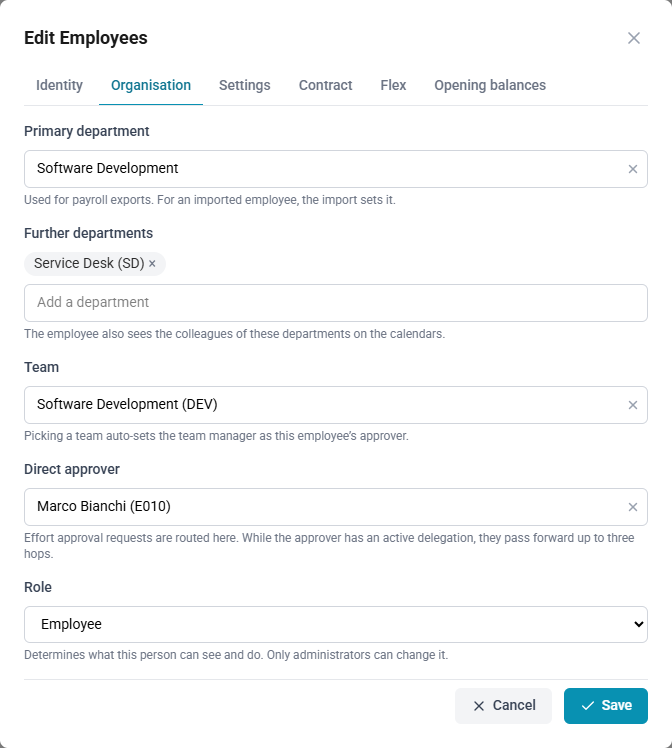
How to remove a further department
- Open the person's record, on the Organisation tab.
- Under Further departments, select the × on the department.
- Select Save.
How to change someone's primary department
- Open the person's record, on the Organisation tab.
- Under Primary department, choose the new department.
- Select Save.
If the new primary was one of their further departments, it moves: a department is never both.
Who may change them
- Administrators and HR: anyone's departments.
- Managers: only the departments and team of people in a team they manage, and never their own. A person a manager creates can be given departments only together with one of the manager's teams.
- Employees: no one's.
Approval policies
A policy that applies to a department applies to everyone in it, whether it is their primary department or a further one. A policy that excludes a department excludes everyone in it.