Public holidays
ChronoHub keeps one calendar of public holidays for the whole company, each holiday recorded for a country or for one of its regions. An employee receives the holidays of their own country and region, and their schedule decides whether a holiday is a day off. Administrators manage the calendar under Master Data → Bank Holidays.
The list
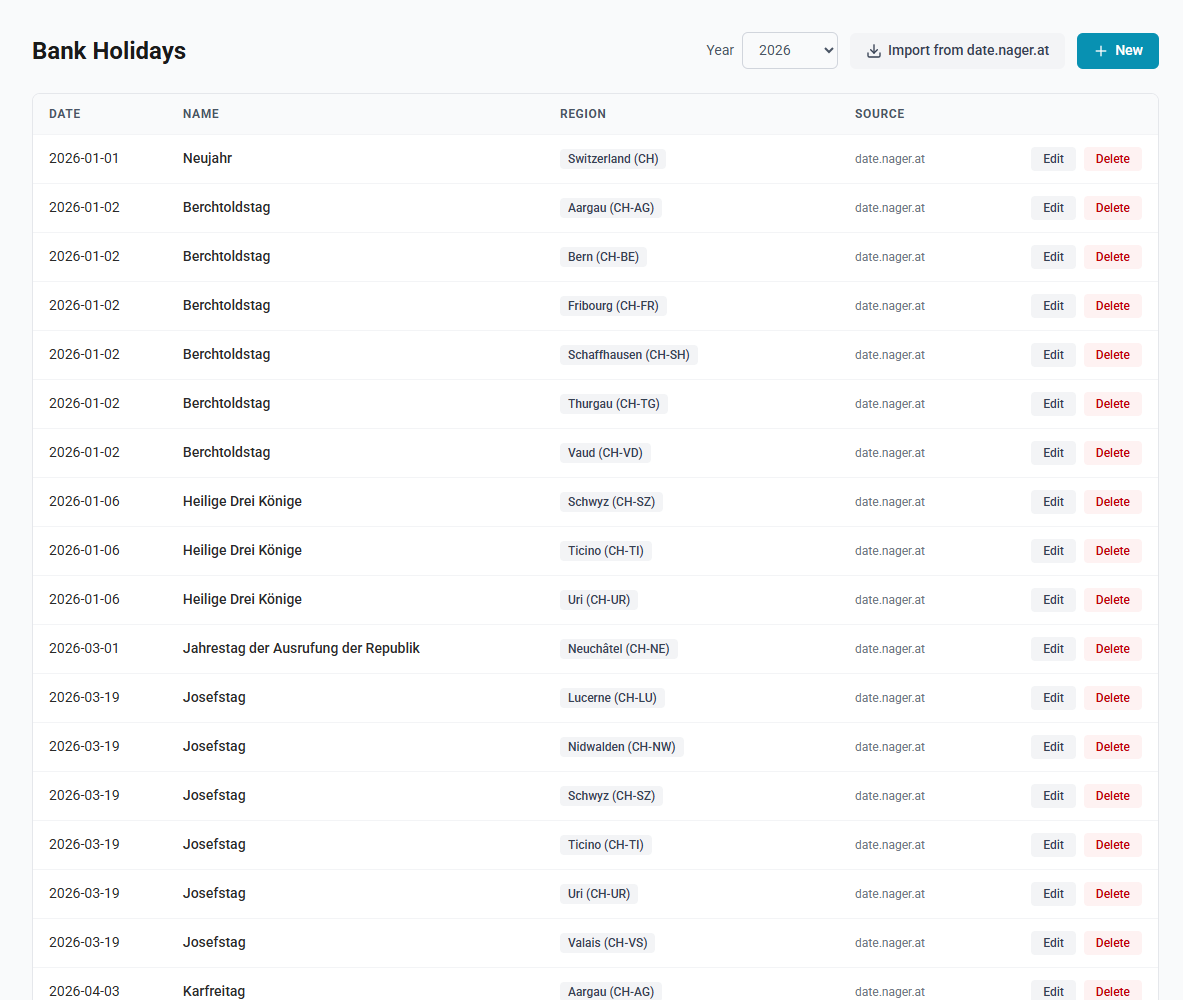
The page lists the holidays of one year at a time; choose it from Year at the top, from five years back to five years ahead. Each row shows:
| Column | What it shows |
|---|---|
| Date | The date of the holiday |
| Name | Its name, with a Half day badge and its times for a half-day holiday, and a Company holiday badge for time off the company gives |
| Region | Where it applies: a country, such as Switzerland (CH), or a subdivision, such as Zurich (CH-ZH) |
| Source | date.nager.at for an imported holiday, manual for one entered by hand |
A year without holidays reads No bank holidays recorded for that year.
Importing holidays
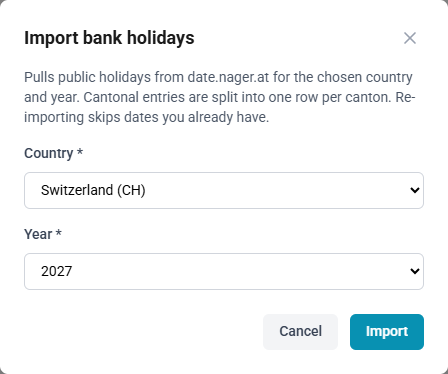
Import from date.nager.at fetches the public holidays of one country and one year from the public service date.nager.at, under their local names.
- National holidays are recorded for the country, such as CH.
- Regional holidays are split into one row per region, such as one row each for CH-ZH, CH-BE and so on, for a cantonal holiday.
- Re-importing skips every holiday already recorded for the same date and region, so manual edits are kept and nothing is duplicated. A holiday deleted since the last import is added again.
After the import, the page shows how many holidays were added and how many already existed, and switches to the imported year.
The import does not identify half days or company holidays; see Half-day public holidays.
How to import a year's holidays
- Open Master Data → Bank Holidays and select Import from date.nager.at.
- Choose the Country. It starts on the company's default country.
- Choose the Year.
- Select Import.
Entering a holiday by hand
A holiday has a Date, a Name and a Region. The Region list offers the company's default country, for a holiday throughout the country, and each of its subdivisions, for a holiday in that region only. The default country is set under Settings → Absences and holidays → Default country; until one is set, the list offers countries only. One date may hold one holiday per region.
Type is Public holiday or Company holiday, for time off the company gives, such as the afternoon of 24 December.
Half day grants only part of the day: from Off from until Off until, or until the end of the day. Each employee is off for the part of their working time it covers; see Half-day public holidays.
How to create a holiday
- Open Master Data → Bank Holidays and select New.
- Enter the Date and the Name.
- Choose the Region.
- Choose the Type.
- If the holiday covers part of the day, tick Half day and enter Off from, and Off until if it ends before the end of the day.
- Select Save.
How to edit or delete a holiday
- Choose the Year of the holiday.
- Select Edit on the holiday, change the date, name, region, type, half day or times, and select Save; or select Delete and confirm.
An imported holiday keeps the source date.nager.at after an edit.
How holidays reach employees
Each employee has a Country and optionally a Region on the Settings tab of their employee record; see Country on an employee.
| Holiday recorded for | Applies to |
|---|---|
| A country, such as CH | Every employee in that country, whatever their region |
| A region, such as CH-ZH | Only employees with that region |
An employee in CH-ZH therefore receives the Swiss national holidays and the holidays of the canton of Zurich, but not those of CH-BE. An employee without a region receives the national holidays only.
What a holiday then does depends on the employee's schedule:
- On a schedule that does not work on bank holidays, the default, the holiday is a day off. It costs nothing in an absence request, expects no hours and is skipped when timecards are filled from the schedule.
- On a schedule ticked Workers on this schedule work on bank holidays, the holiday is an ordinary working day.
- A holiday on a day the schedule does not work changes nothing.
See Schedules.
Employees see their holidays on the home page on the day itself, in the preview of an absence request, and on the absence, team and department calendars. See The calendars.
Who may do what
Only administrators open Bank Holidays. Everyone sees the holidays that apply to them and their colleagues on the calendars.